
UI/UX Design
If people get confused or give up halfway, it is a design problem — and it is fixable. We redraw your screens so the next step is always obvious.
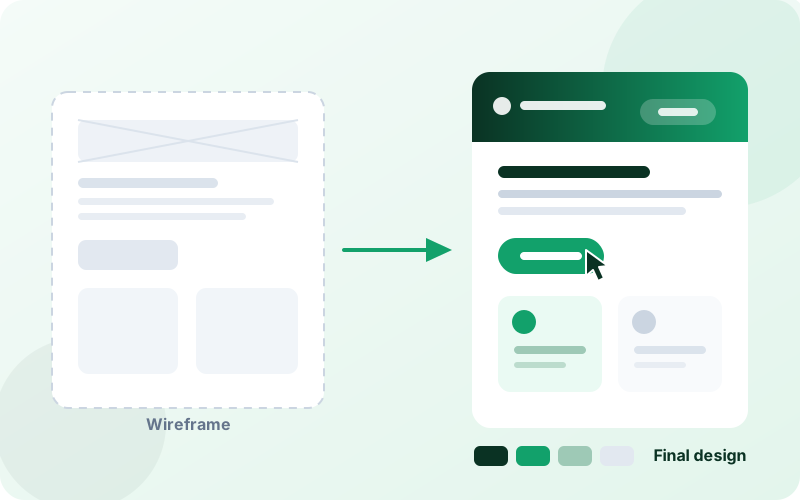
Same product, same traffic — more people finish what they started.
UI is what your screens look like. UX is whether people can actually get something done on them. When a visitor leaves without buying, or a customer calls because they cannot find the button, that is almost never their fault — the screen was built around how the business thinks, not how the customer thinks.
We watch where people get stuck, redraw the screens to remove those moments, and hand you a clickable design you can try before anything is built. Your developers build from that file exactly — so what you approved is what you get.
What you get
- A plain-English report on where people are dropping off, and why
- Rough layouts first, so we agree the structure before worrying about colour
- A clickable design you can tap through on your own phone
- A reusable kit of buttons, forms and headings so future pages stay consistent
- Checks that people with poor eyesight or a screen reader can still use it
- Files handed over ready for developers — no translation step, no guesswork
You do not need an existing product. We design new ones from a blank page just as often.
What We Actually Deliver
Real files and documents you keep — not a slide deck of opinions.
Where People Get Stuck
We go through your site or app as a customer would and list every point of confusion, worst first.
Who You Are Designing For
A short, honest profile of your actual customers and what they are trying to do — no invented personas.
Layouts Before Looks
Grey-box layouts of each screen so we settle what goes where before choosing colours and fonts.
A Clickable Version
A prototype you can tap through on your phone and show your team, weeks before any code exists.
A Reusable Design Kit
Every button, form and heading defined once, so new pages match without a designer.
Usable By Everyone
Colour contrast, text size, keyboard use and screen-reader labels checked against WCAG 2.1.
How A Design Project Runs
You approve each stage before we move to the next one.
We look at what exists
We use your current site or app the way a customer would and note every place we hesitate.
Week 1We agree the structure
Grey-box layouts of the key screens. Cheap to change now, expensive to change later.
Weeks 1–2We design it properly
Full-colour screens in your brand, plus a clickable version you can try on your phone.
Weeks 2–4We hand it to developers
Files, spacing, colours and the reusable kit — ready to build from, ours or yours.
Week 4+Which Design Engagement Fits You?
Pick the one that matches where you are right now, and we will quote it.
Usability Review
Best for: you have a product but people are not converting
We audit your live site or app and hand you a prioritised list of fixes, with mock-ups of the worst offenders.
Full Product Design
Best for: a new site or app, or a full redesign
Every screen designed and clickable, up to around 25 screens, ready for developers to build.
Design System
Best for: a growing team building lots of screens
A documented kit of components your developers reuse, so everything stays consistent as you grow.
Having us build what we design usually works out cheaper than handing the files to a separate developer — ask us to quote both together.
Request a free quoteDesign Work In Live Products
Screens we designed that are now running in real businesses.


Design Questions
What clients want to know before booking a design project.
What is the difference between UI and UX?
UI is how it looks — colours, buttons, spacing. UX is whether someone can actually complete what they came to do. A beautiful screen that hides the checkout button has good UI and bad UX. We do both, because fixing one without the other rarely changes your numbers.
I already have a website. Is a redesign worth it?
Start with the usability review rather than a redesign. You get a ranked list of what is costing you enquiries, and often two or three of those are small fixes you can make without rebuilding anything. If a redesign does turn out to be the answer, the review fee comes off the project.
Can my own developers build from your designs?
Yes, and many clients do. We hand over the design files with every colour, size and spacing specified, plus a reusable component kit. Your team builds from it directly — nothing needs to be interpreted or re-measured.
How do I know the design will work?
Because you try it before it is built. We give you a clickable prototype you can tap through on your own phone and put in front of a few real customers. Problems found there cost nothing to fix; the same problems found after launch cost a rebuild.
Do you design mobile apps as well as websites?
Yes. App design follows different rules to web design — iPhone and Android each have their own conventions that users expect. We design to those conventions so the app feels familiar rather than homemade.
What if I do not like the first design?
That is what the review rounds are for, and they are included. We agree the grey-box structure before any colour work, which is where most disagreements happen anyway — so by the time you see the full design, the big decisions are already settled.
Want to know why people are leaving your site?
Send us the link. We will reply within 24 hours with the first things we would change — before you pay us anything.
Get a Free Quote WhatsApp Us